
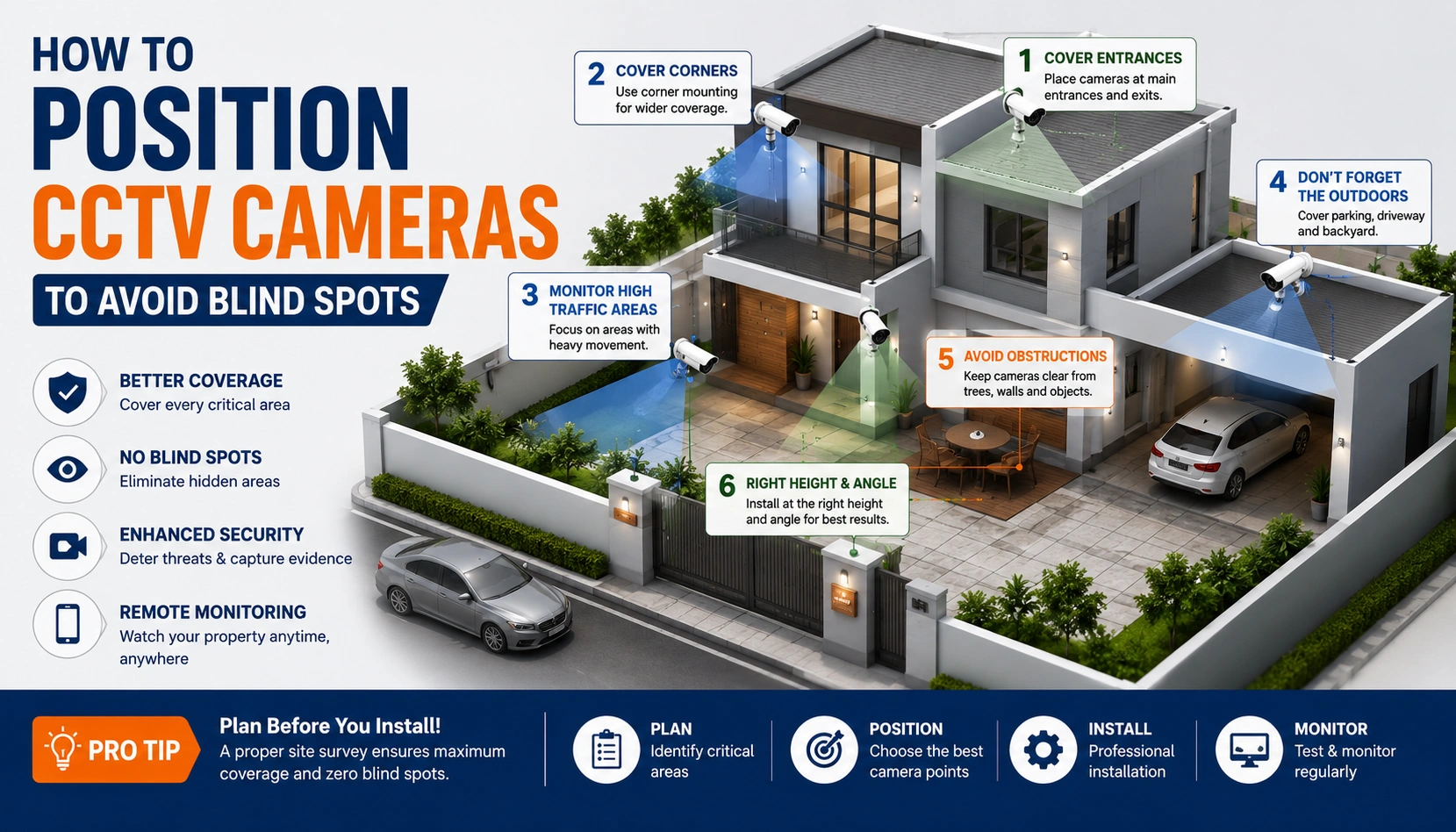
A blind spot is the gap between what your camera is supposed to see and what it actually sees — and it is usually invisible until something happens in exactly that gap. Most blind spots are not caused by having too few cameras. They are caused by the right number of cameras mounted in the wrong place. This guide covers how to position CCTV cameras correctly so every entry point, corridor, and high-value zone stays covered.
Quick Answer: How Do You Avoid CCTV Blind Spots?
To avoid CCTV blind spots, mount cameras at 8–10 feet height with a slight downward tilt, overlap the edges of adjacent camera views by 10–15%, avoid pointing lenses directly at light sources, and always cover choke points — main entrances, gates, and stairwells — rather than open floor space alone. A site survey before installation is the most reliable way to catch blind spots before cameras are mounted.
Why Blind Spots Happen
Blind spots are not random — they follow predictable patterns:
- Cameras mounted without a site survey, so placement is guessed rather than planned around the property actual layout
- Wide-angle lenses pointed too far out, which reduces detail right below the camera — the "dead zone" directly underneath
- Doors, pillars, or signage added after installation that block a previously clear view
- Cameras aimed at only one entry point when a property has two or three
- Fixed cameras used where a PTZ (pan-tilt-zoom) camera was actually needed for wide, changing coverage
The most common blind spot we find on-site during CCTV installation services is not a missing camera — it is a camera facing the wrong 15 degrees.
Core Principles of Blind-Spot-Free Camera Positioning
1. Mount Height Matters More Than Camera Count
Install cameras at a height of 8–10 feet for the best balance between security and image quality. Cameras placed too low are easier to tamper with, while cameras mounted too high often capture movement without providing clear facial identification.
2. Overlap Adjacent Camera Views
Each cameras field of view should overlap the next by around 10–15%. This eliminates blind spots between cameras and ensures continuous coverage when someone moves across different surveillance zones.
3. Cover the Dead Zone Below the Camera
Every camera has a blind spot directly beneath its mounting position. Angle the camera so this dead zone falls on a wall or low-traffic area rather than important locations like entrances, exits, or cash counters.
4. Prioritize Choke Points Over Open Space
Focus cameras on areas where people must pass, such as entry gates, staircases, hallways, and doorways. Monitoring these choke points provides more useful security footage than covering large open areas with little activity.
5. Avoid Backlighting and Glare
Do not point cameras directly toward windows, vehicle headlights, or the rising and setting sun. Position cameras so the primary light source remains behind the camera, ensuring faces and important details remain clearly visible.
6. Match Camera Type to the Space
Choose the right camera for the environment. Fixed cameras are ideal for monitoring specific locations, while PTZ cameras are better suited for large spaces such as warehouses, parking areas, and retail floors where wider coverage and zoom capabilities are required.
Blind Spot Checklist by Property Type
Homes & Apartments
- Main gate and compound wall
- Front door and any side/back entry
- Parking area, including two-wheeler zones
- Balconies facing the street or common areas
See our Residential CCTV Installation solutions for home-specific camera planning.
Offices
- Reception and main entry
- Server room and cash-handling areas
- Staircases and emergency exits
- Parking and loading areas
Explore Commercial CCTV Installation for office-specific camera layouts.
Shops & Retail
- Billing counter, angled to capture both staff and customer
- Entrance and exit, ideally on separate cameras
- Aisles where products are easiest to conceal
- Storeroom and staff-only entry points
Our Commercial CCTV Installation page covers retail-specific camera placement and package options.
Factories & Warehouses
- Loading docks and perimeter fencing
- Wide-angle or PTZ coverage for open floor areas
- Entry points for vehicles and staff separately
- Blind corners created by stacked inventory or machinery
See our Industrial CCTV Installation solutions for factory and warehouse-specific setups.
Our Industrial CCTV Installation solutions are built around exactly this kind of large-area coverage planning.
HD vs IP Cameras for Blind-Spot Coverage
Camera resolution affects how much of a blind spot you can eliminate without adding more hardware. A higher-resolution IP camera can cover a wider area while still capturing usable detail, sometimes replacing two lower-resolution HD cameras. If you are deciding between the two for a blind-spot-sensitive area like a cash counter or gate, our comparison on IP Camera vs HD Camera Price in Hyderabad breaks down where each makes sense.
Why a Site Survey Is the Real Fix
Every blind-spot mistake above is preventable at the planning stage, not after installation. A proper site survey walks the property, identifies choke points and dead zones, and maps camera positions before anything is mounted — which is far cheaper than re-cabling a wrongly placed camera later. This is the first step in every CCTV Camera Installation job we run, and it is free.
If you are budgeting for a new setup, our Complete CCTV Installation Guide covers the full installation process end to end, and our CCTV Installation Cost in Hyderabad guide breaks down pricing by property size.
Frequently Asked Questions
Get a Blind-Spot-Free CCTV Setup
Camera placement is the difference between a system that just records and one that actually protects your property. Smart Secures offers a free site visit to map out camera positions for your home, office, or shop before any installation begins. Explore our CCTV Installation Services or call +91 9346 133 102 to book yours.
