
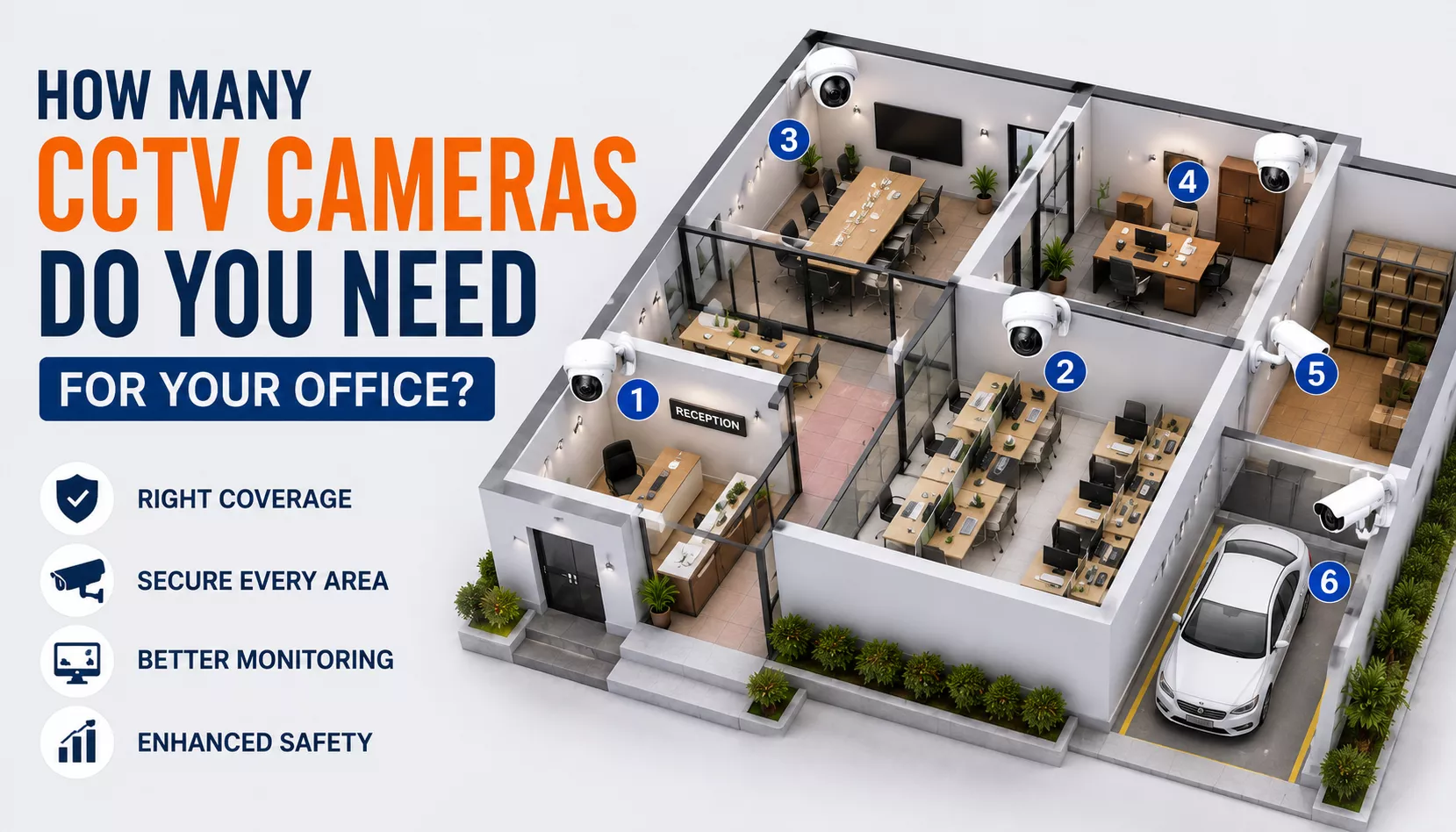
There is no single number of CCTV cameras that works for every office. The right number depends on your office layout, size, entry and exit points, areas that need monitoring and the level of security coverage required.
A small office may need cameras only at important entrances and common areas, while a larger office may require additional coverage for multiple floors, corridors, parking areas and important rooms.
This guide explains how to estimate how many CCTV cameras your office may need and which areas should be considered when planning office surveillance.
- What Determines the Number of CCTV Cameras?
- Start by Reviewing Your Office Layout
- Cameras for Entrances and Exits
- Reception and Visitor Areas
- Work Areas and Common Areas
- Corridors and Internal Access Points
- High-Risk and Important Areas
- Parking and Outdoor Areas
- Check for CCTV Blind Spots
- How to Estimate Your Total Camera Count
- Plan for Future Expansion
- When to Get Professional CCTV Planning
- Frequently Asked Questions
- Final Thoughts
What Determines the Number of CCTV Cameras an Office Needs?
The number of CCTV cameras required depends on more than the total size of the office. Two offices of the same size may need a different number of cameras because their layouts and security requirements are different.
Important factors include:
- Office size and floor layout
- Number of entrances and exits
- Number of floors
- Reception and visitor areas
- Corridors and internal access points
- Parking or outdoor areas
- Rooms containing valuable equipment or assets
- Areas where additional security monitoring is required
- Camera type and viewing coverage
The best approach is to identify the areas that genuinely need monitoring rather than choosing a camera count before reviewing the property.
Start by Reviewing Your Office Layout
Start with a simple review of the office floor plan. Walk through the property and identify all areas where people enter, exit or access important parts of the office.
Mark locations such as:
- Main entrance
- Secondary entrances
- Emergency exits
- Reception
- Corridors
- Common areas
- Storage rooms
- Server or equipment rooms
- Parking areas
This gives you a clearer starting point for deciding where cameras may be useful.
Cameras for Entrances and Exits
Entrances and exits are usually among the first areas considered for office CCTV coverage. These locations can help monitor people entering and leaving the property.
Consider:
- Main office entrance
- Secondary entrances
- Rear doors
- Emergency exits where monitoring is appropriate
The number of cameras required depends on whether one camera can provide a useful view of the entire access point or whether the layout creates areas that cannot be clearly covered.
Reception and Visitor Areas
Reception areas are often important for offices that receive employees, customers, visitors or delivery personnel.
A camera may help provide visibility of:
- The reception entrance
- Visitor movement
- The waiting area
- Important access points near reception
Camera placement should provide useful coverage without unnecessarily monitoring areas that do not require surveillance.
Work Areas and Common Areas
Not every desk or workspace necessarily needs its own CCTV camera. Instead, consider whether there are common areas that require security monitoring.
Depending on the office, these may include:
- Shared work areas
- Meeting spaces where appropriate
- Break areas
- Common access areas
When planning cameras inside an office, privacy considerations and applicable workplace policies should always be taken into account.
Corridors and Internal Access Points
Corridors can connect important areas of an office and may require CCTV coverage when they provide access to restricted rooms or other sensitive areas.
Check whether a camera placed at one end of a corridor can provide useful visibility. Long or irregularly shaped corridors may require additional planning.
The goal is to reduce unnecessary blind spots rather than simply placing cameras at fixed distances.
High-Risk and Important Areas
Some office areas may require additional security attention because they contain valuable equipment, sensitive materials or restricted access points.
Depending on your office, consider:
- Server rooms
- Equipment rooms
- Storage areas
- Document storage locations
- Restricted access areas
The level of CCTV coverage should match the actual security requirements of each area.
Parking and Outdoor Areas
Offices with parking areas, gates or outdoor access points may require additional cameras.
Consider coverage for:
- Vehicle entrances and exits
- Parking areas
- Outdoor gates
- Building access points
Outdoor camera planning should consider lighting conditions, weather exposure and obstacles that could affect the camera view.
Check for CCTV Blind Spots
After identifying possible camera locations, check for blind spots. Walls, furniture, partitions, doors and corners can block a camera view.
Walk through the office and review each planned camera location from the perspective of the area being monitored.
Ask the following questions:
- Can the camera clearly see the intended area?
- Are important access points visible?
- Is part of the area blocked by walls or furniture?
- Does lighting affect image quality?
- Are there areas that remain uncovered?
For more detailed guidance, read our guide to positioning CCTV cameras and avoiding blind spots.
How to Estimate Your Total CCTV Camera Count
A practical way to estimate the number of cameras is to create a list of areas that require monitoring.
| Office Area | Coverage Requirement |
|---|---|
| Entrance and Exit Points | Review each important access point separately |
| Reception | Consider visitor and entrance visibility |
| Corridors | Check access routes and blind spots |
| Common Areas | Monitor only where there is a genuine security requirement |
| Important Rooms | Consider valuable equipment or restricted access |
| Parking and Outdoor Areas | Review access points, gates and vehicle areas |
Once you have listed the areas that require coverage, review whether one camera can effectively cover each area or whether the layout requires additional cameras.
This approach provides a more reliable estimate than using a fixed number of cameras based only on office size.
Plan for Future CCTV Expansion
Your office security requirements may change over time. Before selecting a CCTV system, consider whether additional cameras may be needed in the future.
Future expansion may be useful if:
- The office is expected to grow
- Additional rooms may be added
- Parking areas may expand
- New restricted areas may be created
- Additional entrances may be used later
Planning ahead can make it easier to expand the system when requirements change.
When Should You Get Professional CCTV Planning?
Small offices may be able to create a basic CCTV coverage plan independently. However, professional planning can be useful for larger or more complex properties.
Consider professional assistance when:
- Your office has multiple floors
- The layout is complex
- You require multiple indoor and outdoor cameras
- There are important blind spots to address
- You need network-based CCTV infrastructure
- You want a complete site survey before installation
A professional site survey can help identify suitable camera locations and determine the equipment needed for the property.
If you need professional assistance, explore our CCTV installation services in Hyderabad.
Frequently Asked Questions
Final Thoughts
The right number of CCTV cameras for an office depends on the property, not simply its total size. Start by identifying entrances, exits, important rooms, access routes and other areas that genuinely require monitoring.
A careful review of the office layout can help reduce blind spots and avoid installing unnecessary cameras.
For broader CCTV planning guidance, read our CCTV Installation Planning Guide for Homes, Offices & Shops.
If you are planning the complete installation process, you can also read our CCTV Camera Installation Guide.
