
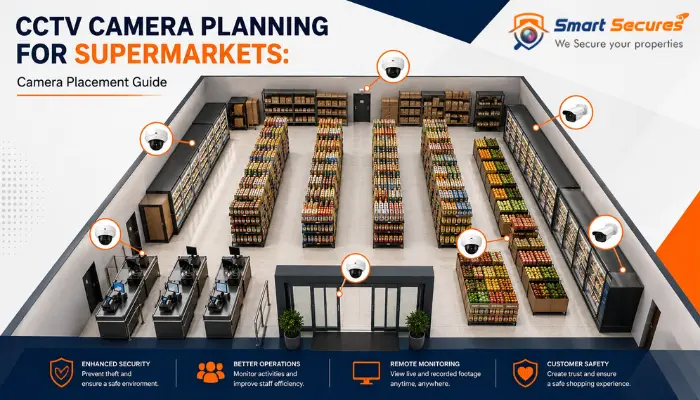
A supermarket is hard to secure with CCTV. There are wide aisles, tall shelves, many doors, a busy checkout line, and a busy back room. Buy the best cameras on the market, and you can still miss a theft. One camera placed just three feet off can leave a gap.
This guide shows you where to put every camera in a supermarket. It covers the right height, the right angle, and how many cameras you need. It is built for store owners, loss prevention teams, and anyone planning CCTV camera installation for a supermarket or grocery store.
Quick answer: Put cameras at every door, above each checkout, at both ends of every aisle, near high-theft products, in the cash office, at the loading dock, and across the parking lot. Most mid-size supermarkets (15,000–30,000 sq ft) need 24 to 40 cameras for full coverage with no blind spots.
- Why Placement Matters More Than Camera Count
- How Many CCTV Cameras Does a Supermarket Need?
- Best Places to Install CCTV Cameras in a Supermarket
- Camera Height, Angle, and Lens Guide
- Full Cost Breakdown — What You Are Paying For
- Choosing the Right Camera Type for Each Zone
- IP Camera vs HD Camera: Which One Fits Your Supermarket?
- Common CCTV Placement Mistakes
- Legal and Privacy Rules to Know
- Step-by-Step: Plan Your Supermarket CCTV Layout
- CCTV Installation Services in Hyderabad
- FAQs
- Key Takeaways
Why Placement Matters More Than Camera Count
Shrinkage is the loss of stock to theft, fraud, and error. It can cost a supermarket a big slice of yearly sales. A store that adds ten more cameras with no plan often ends up filming the same aisle twice. Meanwhile, the one corner where theft happens stays dark.
Good placement does three things that a high camera count alone cannot do:
- It closes blind spots. Every shelf, corner, and door stays in view from at least one camera.
- It captures clear evidence. A camera set too high or too far away only records a blur, not a face.
- It helps the whole store, not just security. Footage of foot traffic also helps you plan staff schedules and store layout.
How Many CCTV Cameras Does a Supermarket Need?
There is no single number that fits every store. But store size gives you a solid starting point.
| Store Size | Typical Camera Count | Coverage Focus |
|---|---|---|
| Small grocery (under 5,000 sq ft) | 8–14 | Entrance, checkout, aisles, back office |
| Mid-size supermarket (5,000–20,000 sq ft) | 16–30 | All of the above, plus full aisle coverage, stockroom, and dock |
| Large supermarket (20,000+ sq ft) | 30–50+ | All of the above, plus parking lot, extra doors, cash office, self-checkout bank |
As a rule of thumb, plan one camera for every 15 to 20 feet of aisle. Add one camera per checkout lane, one per door, and one for each high-value display.
Best Places to Install CCTV Cameras in a Supermarket
1. Entrances and Exits
Every door needs a camera that gets a clear, face-level view. Mount it 7 to 8 feet high. Angle it slightly down, so it catches faces before shoppers walk past. Use a narrow-angle camera on the door itself. Add a wide-angle camera for the space around it. This way, you record both who came in and what they did next.
2. Checkout and Self-Checkout Lanes
Checkout is where cash, cards, and products all change hands. It is the single most important zone in the store. Each staffed lane needs its own overhead camera pointed down at the register. Self-checkout needs even more coverage. A bank of four to six self-checkout terminals should have two to three cameras. These should cover scanning, bagging, and the exit gate together. This area sees the most scan skips and item swaps.
3. Sales Floor and Aisles
Aisles are long and narrow, and shelves block the view. One camera at one end rarely sees the far end clearly. Place a camera at each end of every aisle. Angle it down the length of the shelf. For aisles longer than 40 feet, add one more camera in the middle. Keep the height low enough to catch faces through shelf gaps. Keep it high enough to stop tampering. Most supermarket ceilings work well at 9 to 10 feet.
4. High-Value and High-Theft Product Zones
Some items draw more theft than others. Think razors, baby formula, alcohol, medicine, meat, and electronics. Add a dedicated camera above or beside each of these displays. Do this even if the aisle already has coverage. Use a close-up angle here. You need to see specific items and hand movements, not just the whole aisle.
5. Cash Office and Safe Room
The cash office holds the stores biggest financial risk. It needs its own camera, separate from the main system. Keep this footage on a different channel with limited access. Point the camera at the safe, the counting table, and the door. Avoid pointing it at PIN pads or sensitive paperwork.
6. Stockroom, Receiving Dock, and Loading Bay
Loss does not only happen on the sales floor. Deliveries and stock handling create their own risks. Cover the dock door, the staging area where pallets wait, and the main walkway through the stockroom. A camera aimed at the delivery paperwork or scanning station helps you check stock against what is logged.
7. Parking Lot and Perimeter
Outdoor cameras protect cars, catch cart theft, and record trouble before it reaches the door. Mount these higher, at 10 to 13 feet. Use wide-angle or PTZ (pan-tilt-zoom) cameras for open areas. Add extra cameras at cart corrals and any second entrance.
8. Break Rooms and Back-Office Areas
Some back-of-house coverage helps with safety and accountability. But restrooms, changing areas, and break rooms need privacy. Never film these spaces. Keep staff-area cameras limited to hallways, storage access points, and time-clock areas. Always tell staff where cameras are.
Camera Height, Angle, and Lens Guide
| Zone | Mounting Height | Angle | Best Lens Type |
|---|---|---|---|
| Entrances/exits | 7–8 ft | 10–15° downward | Fixed, narrow angle |
| Checkout lanes | 8–9 ft, overhead | Straight down or slight angle | Fixed, close focus |
| Aisles | 9–10 ft | 15–30° downward | Wide-angle or fisheye |
| High-value displays | 8–9 ft | Direct, close angle | Fixed, zoomed |
| Cash office | 8–9 ft | Covers safe and entry point | Fixed, high resolution |
| Stockroom/dock | 9–11 ft | Wide view of walkways | Wide-angle |
| Parking lot | 10–13 ft | Wide sweep | PTZ or wide-angle |
A camera set too high loses facial detail. One set too low is easy to block or tamper with. When in doubt, keep faces near the center of the frame at the spot where customers pause — a shelf, a register, or a door.
Full Cost Breakdown — What You Are Paying For
Understanding each component helps you avoid overpaying.
1. Cameras
- HD camera: ₹1,200 – ₹2,500 per piece
- IP camera: ₹2,500 – ₹8,000 per piece
2.DVR or NVR Recorder
- 4-channel DVR setup Hyderabad: ₹3,000 – ₹6,000
- NVR system: ₹5,000 – ₹12,000
3. Hard Disk Storage
- 1TB hard disk: ₹6,000 – ₹8,000
- 2TB hard disk: ₹9,500 – ₹14,500
4. Wiring and Accessories
- ₹2,000 – ₹5,000 depending on property size and layout
5. Installation Charges
- ₹1,500 – ₹3,000 for standard homes and shops
Pro Tip: Always choose at least a 2TB hard disk. It gives you around 20–25 days of video backup. A 1TB disk fills up in 10–12 days and leaves gaps in your footage.
Choosing the Right Camera Type for Each Zone
- Dome cameras are discreet and tough. They work well for general aisle and sales-floor coverage where you do not want cameras to feel intrusive.
- Turret cameras are easy to angle by hand. They give strong image quality and work well at checkout and entrances.
- Bullet cameras are highly visible, which adds a deterrent effect. They suit parking lots and loading docks.
- Fisheye cameras cover 180 to 360 degrees with one unit. They can replace several fixed cameras on an open sales floor.
- PTZ cameras let an operator track movement in real time. They work well in large parking lots or big floor plans.
IP Camera vs HD Camera: Which One Fits Your Supermarket?
Once you know where each camera goes, the next choice is the signal type behind it. This is where most store owners compare IP camera vs HD camera systems.
| Factor | IP Camera | HD (Analog/HD-CVI) Camera |
|---|---|---|
| Image quality | Higher resolution, better digital zoom on high-value displays | Good quality, lower max resolution |
| Cabling | Runs on network (Ethernet/PoE) cable | Runs on coaxial cable |
| Scalability | Easy to add more cameras or channels later | Limited by DVR channel count |
| Remote viewing | Built for cloud and mobile access | Needs extra hardware for remote access |
| Upfront cost | Higher per camera | Lower per camera |
| Best fit | Large or multi-branch supermarkets that want analytics, face detection, and remote monitoring | Small stores on a tight budget that need reliable basic coverage |
For a single small grocery store, an HD system can still deliver solid coverage at a lower cost. For a mid-size or large supermarket — especially one running self-checkout, POS integration, or multiple locations — an IP camera system is worth the extra spend. Many installers now offer bundled IP camera packages that combine cameras, an NVR, storage, and setup in one quote, which is often the simplest way to budget a full store rollout.
Common CCTV Placement Mistakes
- Ignoring shelf changes. Aisle-end displays shift often through the year. They can block a cameras view without anyone noticing.
- Backlighting from windows or bright signs. A camera facing a glass storefront often records a dark shape instead of a face.
- One camera per aisle instead of one per aisle-end. A single mid-aisle camera rarely covers both ends clearly.
- Skipping the cash office and dock. These are two of the highest-risk spots. Yet they are often the last to get their own camera.
- No overlap between camera views. A gap of even a few feet between two cameras creates a blind spot someone can use.
Legal and Privacy Rules to Know
Camera rules change by state and country. But a few basics apply almost everywhere:
- Never place cameras in restrooms, changing rooms, or any space where people expect privacy.
- Put up clear signs that tell customers and staff that CCTV is in use.
- Limit access to cash-office and HR footage to approved staff only.
- Check local storage rules. Some places set a minimum time to keep footage. Others set a maximum.
Check current rules with a local security expert or lawyer before you finalize your layout. Rules change by region.
Step-by-Step: Plan Your Supermarket CCTV Layout
1. Get a scaled floor plan. Include doors, checkout lanes, aisles, the stockroom, and the parking lot.
2. Mark high-risk zones first. Start with the cash office, high-value displays, doors, and the dock.
3. Plot each camera and its view. Draw the coverage area for each camera to spot gaps early.
4. Check for overlap, not just coverage. Cameras next to each other should share a few feet of view.
5. Check lighting and blocked spots. Walk the floor at different times of day to catch glare and shadows.
6. Set the right height and angle for each zone, using the table above.
7. Test and adjust after install. Review footage in the first week. Move any camera with a surprise blind spot.
CCTV Installation Services in Hyderabad
A good layout only works if the installation matches it — correct cable runs, correct mounting height, and a properly configured NVR. If you are setting up or upgrading a store in Telangana, look for CCTV installation services in Hyderabad that have specific experience with supermarkets and grocery formats, not just homes and small offices. Supermarket installs involve longer cable runs, more channels, and tighter coordination around shelving and checkout counters, so retail experience matters.
When you request quotes, ask each installer to walk your floor plan and confirm:
- Camera count and placement matched to your store size (see the table earlier in this guide)
- Whether they are proposing an IP camera system, an HD system, or a mix, and why
- NVR/DVR storage capacity and retention period
- Cabling plan, especially for checkout lanes and the cash office
- Warranty and post-installation support
CCTV installation cost in Hyderabad varies with camera count, camera type (IP vs HD), cable length, and storage capacity. As a rough guide, small stores with 8–14 cameras sit at the lower end of the range, while a full mid-size supermarket rollout with 20–30 IP cameras, PoE cabling, and a higher-capacity NVR costs more. Always get an itemized quote — camera hardware, cabling, NVR/storage, and labor should each be listed separately, so you can compare IP camera packages from different installers on equal terms rather than a single bundled number.
Frequently Asked Questions
Key Takeaways
Place cameras at every door, checkout lane, aisle-end, high-value display, cash office, dock, and parking area.
Match camera height and angle to the zone. Doors and checkouts need facial detail. Aisles and lots need wide coverage.
Plan for overlap between camera views to close every blind spot.
Update your layout whenever shelves, displays, or store layout change.
Good supermarket CCTV placement starts as a planning task, not a shopping task. Map every high-risk zone. Match the right CCTV camera types and height
